Digital Engineering for Legacy Systems
A practical guide to digital engineering for legacy systems, with decisions, implementation checks and limitations for business teams.
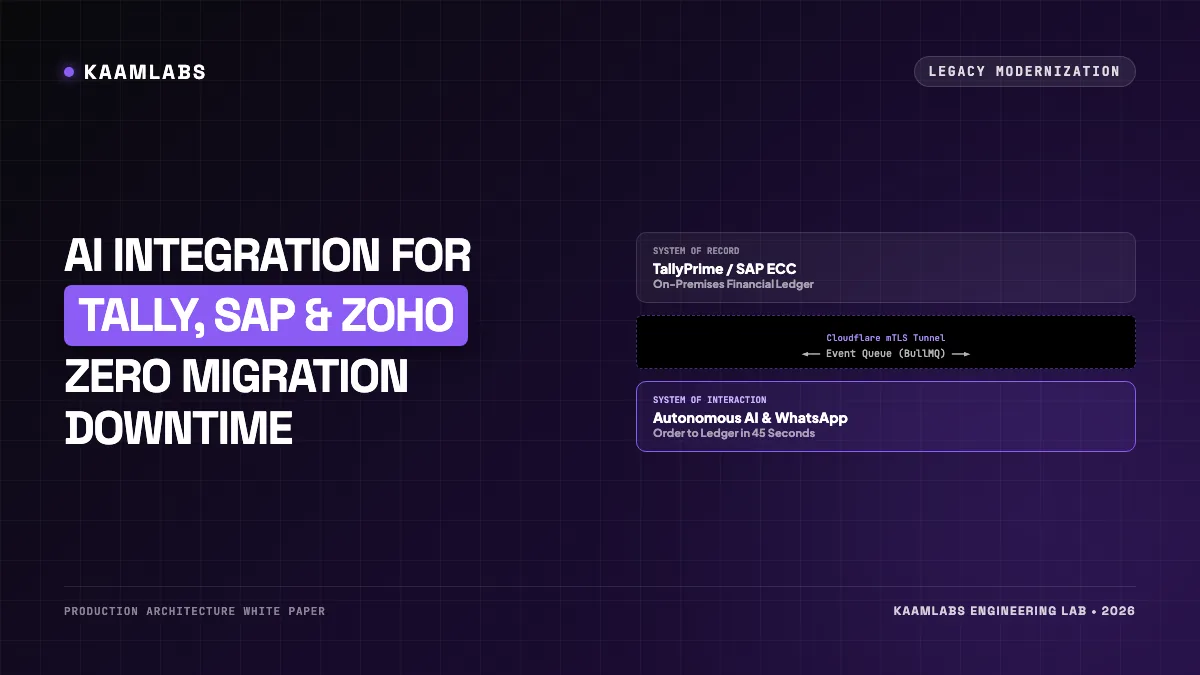
[!NOTE]
Engineering Blueprint & Systems Modernization Guide: This technical manual is published by KaamLabs Studio for Chief Information Officers (CIOs), Enterprise Integration Architects, and Systems Engineering Directors. It provides a production-tested playbook for integrating modern autonomous AI agents, intelligent workflow automation, and real-time communication channels with legacy on-premises ERPs, relational databases, and desktop accounting software without costly "rip-and-replace" migrations. Information is compiled from enterprise production deployments on an "as-is" basis with zero operational liability assumed.
THE "RIP-AND-REPLACE" TRAP
[Legacy ERP Running Business] ──► [18-Month Multi-Crore Migration] ──► [Severe Factory Disruption]
                                                                                │
                                                                                ▼
                                                                     [Budget Overruns & Chaos]

THE KAAMLABS DIGITAL ENGINEERING WRAPPER
[Legacy ERP (Tally / SAP)] ◄── High-Speed Local Adapter ──► [Modern Headless API Gateway]
     (Untouched Ledger)                                                │
                                    ┌──────────────────────────────────┴──────────────────┐
                                    ▼                                                     ▼
                          [Autonomous AI Agents]                                [WhatsApp Operations]
The Pragmatic Reality:
Your legacy accounting software is not broken; its user interface and access protocols are simply dated. The underlying relational database holds decades of pristine ledger records, GST audit histories, and vendor relationships. The engineering solution is not to destroy the foundation, but to build a modern, high-speed Digital Engineering Wrapper around it.
2. The Digital Engineering Alternative: Headless API Adapters & Event Bridges
Modern digital engineering decouples the System of Record from the System of Interaction:
┌────────────────────────────────────────────────────────────────────────┐
│                   THE THREE-TIER LEGACY ADAPTER STACK                  │
└──────────────────────────────────┬─────────────────────────────────────┘
                                   │
      ┌────────────────────────────┴────────────────────────────┐
      ▼                                                         ▼
[TIER 1: THE INTERACTION SURFACE]                         [TIER 2: THE DIGITAL ENGINE MIDDLEWARE]
• Mobile WhatsApp Business API                            • Next.js 15 Edge Backend
• Autonomous Voice Receptionist                           • Redis Event Queue (BullMQ)
• Next.js 15 B2B Client Portals                           • Idempotency & Rate-Limiter Engine
• Automated Invoice OCR Ingestion                         • Autonomous ReAct Reasoning Agents
                                                                │
                                                                ▼
                                                          [TIER 3: THE ON-PREMISES CONNECTOR]
                                                          • Secure Cloudflare Zero Trust Tunnel
                                                          • Local Tally XML / ODBC Daemon
                                                          • Local SAP BAPI / RFC Connector
                                                          • Desktop TallyPrime / SAP ECC 6.0
By placing an event-driven middleware bridge between external channels and your on-premises software, external users (customers, dealers, sales reps) interact with modern, measured digital interfaces while your internal accounting staff continues using their familiar desktop software.
3. The TallyPrime Integration Blueprint: XML Gateway & Local ODBC Bridges
TallyPrime (and legacy Tally.ERP 9) is the backbone of Indian commerce, powering accounting for over 2 million businesses. Despite being a desktop application, Tally contains a powerful built-in XML Data Interchange Gateway operating over local HTTP (default port `9000`).
The Communication Mechanics:
4. Event-Driven Architecture: Redis, BullMQ & Resilient Retry Queues
Connecting cloud-based AI agents to on-premises office computers introduces a major engineering challenge: intermittent network connectivity.
[Inbound WhatsApp Order Placed]
             │
             ▼
[Cloud API Gateway (Next.js / FastAPI)]
             │
             ▼
[Redis-Backed BullMQ Queue (In Cloud)] ◄── Job Stored Persistently (data-quality)
             │
             ├──► [Ping On-Premises Connector Daemon]
             │         │
             │         ├──► [On-Premises Connection ALIVE]
             │         │         │
             │         │         ▼
             │         │    [Post XML to Tally Gateway] ──► [Voucher Created in 120ms]
             │         │
             │         └──► [On-Premises Connection OFFLINE]
             │                   │
             │                   ▼
             │              [Automatic Exponential Backoff Retry]
             │              (Retries at 30s, 2m, 5m, 15m; Alerts Admin if down > 1hr)
5. Production Code Implementation: A Bi-Directional Tally-to-PostgreSQL Bridge
Below is a production-grade Python microservice demonstrating how to query stock levels from a local TallyPrime instance and return clean JSON to an AI agent:
# services/tally_connector.py
import requests
import xml.etree.ElementTree as ET
from typing import Dict, Any, Optional

TALLY_URL = "http://127.0.0.1:9000"

def get_stock_item_balance(stock_item_name: str) -> Optional[Dict[str, Any]]:
    xml_request = f"""<ENVELOPE>
        <HEADER>
            <TALLYREQUEST>Export Data</TALLYREQUEST>
        </HEADER>
        <BODY>
            <EXPORTDATA>
                <REQUESTDESC>
                    <REPORTNAME>Stock Summary</REPORTNAME>
                    <STATICVARIABLES>
                        <SVEXPORTFORMAT>$SysName:XML</SVEXPORTFORMAT>
                        <STOCKITEMNAME>{stock_item_name}</STOCKITEMNAME>
                    </STATICVARIABLES>
                </REQUESTDESC>
            </EXPORTDATA>
        </BODY>
    </ENVELOPE>"""

    try:
        response = requests.post(
            TALLY_URL,
            data=xml_request.encode('utf-8'),
            headers={'Content-Type': 'text/xml'},
            timeout=5.0
        )

        if response.status_code != 200:
            return None

        root = ET.fromstring(response.content)
        closing_balance = root.find(".//CLOSINGBALANCE")
        rate = root.find(".//BASICRATE")

        return {
            "stock_item": stock_item_name,
            "closing_balance": closing_balance.text.strip() if closing_balance is not None else "0",
            "standard_rate": rate.text.strip() if rate is not None else "0.00",
            "status": "AVAILABLE"
        }

    except requests.exceptions.ConnectionError:
        return {
            "stock_item": stock_item_name,
            "error": "Tally on-premises gateway unreachable. Queued for synchronization.",
            "status": "OFFLINE"
        }
5B. The SAP ECC & S/4HANA Modernization Pattern: Headless BAPI Wrappers
While Tally powers SME bookkeeping, large manufacturing and infrastructure conglomerates run on SAP ECC 6.0 or SAP S/4HANA.
Traditional SAP development relies on ABAP programmers writing custom transactions (T-Codes), which creates months of lead time for minor interface modifications. Modern digital engineering connects AI agents directly to SAP using Headless BAPI (Business Application Programming Interface) Wrappers:
[Inbound Agentic Signal] ──► [FastAPI Middleware Engine]
                                      │
                                      ▼
                         [PyRFC Connector Daemon]
                                      │ (Internal Network Handshake)
                                      ▼
                 [SAP NetWeaver RFC Gateway (Port 3300)]
                                      │
          ┌───────────────────────────┴───────────────────────────┐
          ▼                                                       ▼
[BAPI_SALESORDER_CREATEFROMDAT2]                         [BAPI_MATERIAL_AVAILABILITY]
• Validates Sold-To Party & Plant                        • Real-time stock check at Storage Loc
• Verifies Pricing Condition Types                       • Returns Available-to-Promise (ATP)
• Commits Sales Order with SO Number                     • Zero manual SAP screen navigation
PyRFC Production Implementation Pattern:
# services/sap_rfc_connector.py
from pyrfc import Connection
from typing import Dict, Any

def check_sap_material_inventory(material_sku: str, plant_id: str = "1000") -> Dict[str, Any]:
    sap_config = {
        'ashost': '10.0.1.25',
        'sysnr': '00',
        'client': '100',
        'user': 'SERVICE_AI_CONNECTOR',
        'passwd': 'SECURE_VAULT_PASSWORD',
    }

    with Connection(**sap_config) as conn:
        result = conn.call('BAPI_MATERIAL_AVAILABILITY',
                           PLANT=plant_id,
                           MATERIAL=material_sku,
                           UNIT='PC')

        atp_quantity = result.get('AV_QTY_PLT', 0)
        return {
            "sku": material_sku,
            "plant": plant_id,
            "available_quantity": atp_quantity,
            "status": "IN_STOCK" if atp_quantity > 0 else "BACKORDER"
        }
5C. Synchronizing Modern CRMs: Zoho CRM & Salesforce Event Webhook Queues
Modern sales and support teams frequently operate across Zoho CRM or Salesforce while accounting runs on desktop ERPs. Without automated digital engineering, sales reps spend hours manually updating lead statuses, copying deal values, and generating proforma invoices.
The Real-Time Bi-Directional Webhook Pipeline:
6. Preventing Duplicate Entries: Idempotency Keys & Distributed Transaction Locks
When automating financial ledgers, the worst possible failure mode is a duplicate accounting entry: an order hitting the ERP twice, generating two GST tax invoices for a single transaction.
The Idempotency Shield:
Every inbound transaction receives a cryptographically generated Idempotency Key based on the source payload:
`Idempotency Key = SHA256(Customer Phone + Timestamp Minute + Cart Total + Item SKUs)`
7. Bridging On-Premises Isolation: Reverse SSH Tunnels & Cloudflare Tunnels
How does an AI agent running on a secure cloud server communicate with a desktop computer inside an office behind dynamic IP addresses and corporate NAT firewalls?
Traditional IT consultancies demand expensive static IP leases and complex router port forwarding—introducing severe cybersecurity vulnerabilities.
The Modern Zero-Trust Solution:
KaamLabs deploys lightweight Cloudflare Tunnels (`cloudflared`) or secure Reverse WireGuard Tunnels:
8. Enterprise Case Study: 12 Textile Mills Automated on WhatsApp in Surat
The Client Profile:
A major synthetic textile and fabric weaving conglomerate based in Ring Road Market, Surat, operating 12 production mills and supplying over 1,800 wholesale garment manufacturers across India.
9. The Digital Engineering Modernization Checklist
Before considering an ERP replacement, evaluate your modernization readiness:
10. Frequently Asked Questions (FAQ)
Can an external AI agent corrupt our Tally or SAP database?
No. Production adapters do not write directly to underlying database tables or memory addresses. In Tally, integrations interact strictly with the official XML data interchange gateway, which validates accounting vouchers against company rules, tax ledgers, and voucher numbering sequences before committing.
What happens if our local office internet goes down?
The cloud-based AI agent continues interacting with customers seamlessly. All incoming orders, payments, and tickets are stored in a persistent Redis queue (BullMQ). As soon as the office internet connection reconnects, the connector daemon synchronizes all pending vouchers with full idempotency protection.
How long does it take to connect an AI agent to an existing TallyPrime system?
With KaamLabs' pre-built integration modules, deploying a functional bi-directional Tally XML bridge typically takes 5 to 8 business days, followed by a week of automated sandbox testing and verification.
Put this into a project brief
Describe the user task, the current bottleneck, the systems involved and how you will measure a successful result. Ask for a scoped pilot and acceptance checks before expanding the implementation.
Discuss a website project or explore published client work.
Essential Takeaways & Clarifications
Yes. An on-premises connector daemon interacts with Tally's local XML/HTTP gateway over port 9000, connected to cloud AI agents via an outbound-only Cloudflare Zero-Trust Tunnel with zero open firewall ports.
Use this guidance in context
Technical examples are starting points for a project review. Platform requirements change, and results depend on implementation and starting conditions. Refer to the linked documentation and test the actual workflow.
Send a correction with the page URL to hello@kaamlabs.in.
Consult the source for current requirements and the context of each referenced statement.
Explore delivery details, project examples and practical buying guidance.
Ready to Upgrade to Sub-Second Modern Architecture?
Eliminate development delays. Ship clean Next.js, FastAPI, or mobile systems with dedicated engineering and milestone-driven delivery.
Related Engineering Deep-Dives
When to Redesign a WordPress Website
Web DevelopmentWhen to Redesign a WordPress Website

The 24/7 Digital Salesperson
The Death of Generic Templates
Web Development